
CRM + AI + connected workflows

Your CRM.
With AI that
gets to work.

Keep your customer story in one place. Let specialist AI help with the research, outreach and follow-through—with your team in control.

For revenue teams, healthcare staffing and construction.

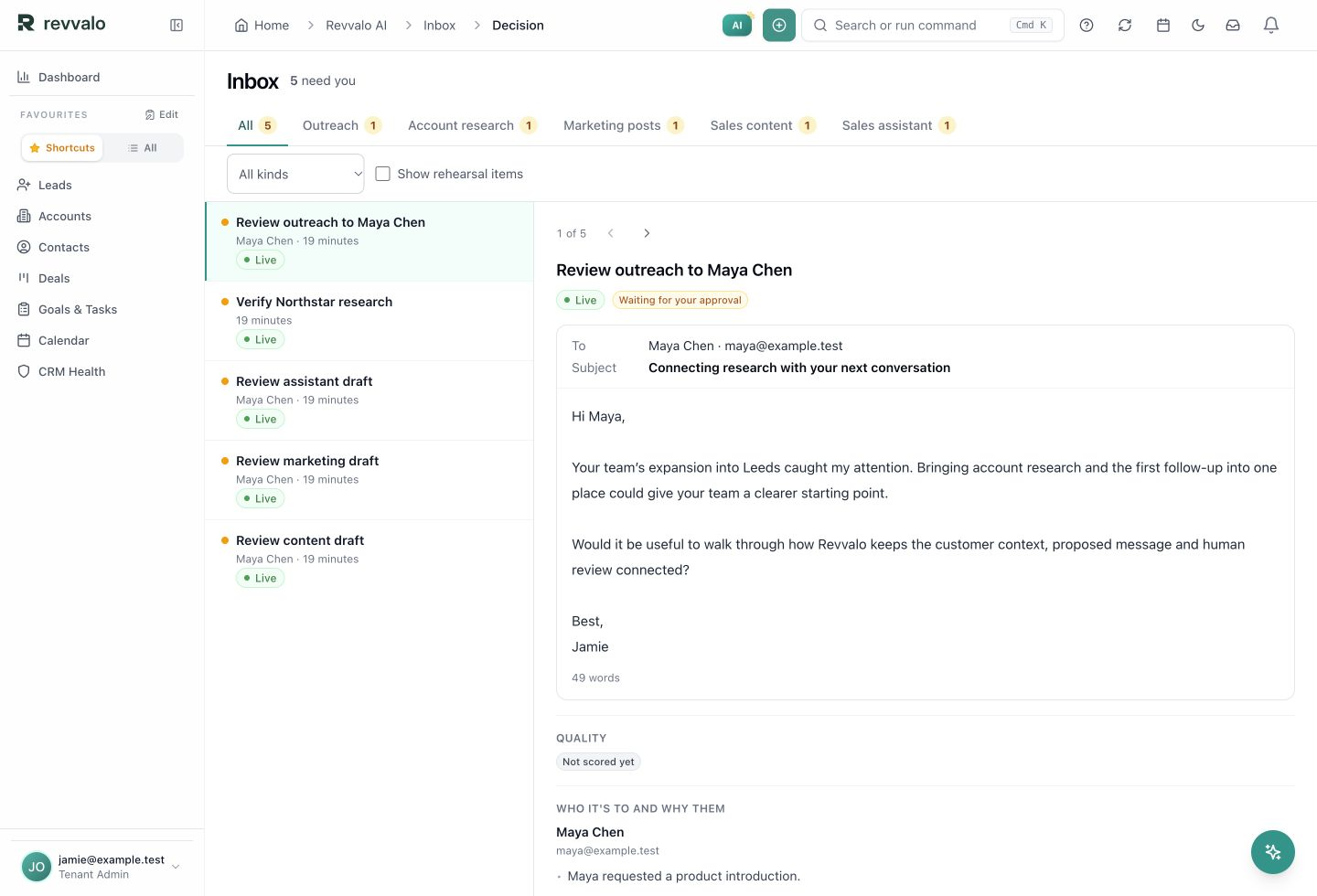
Revvalo AI inbox with a proposed outreach email and review queue using fictional demo records.
AI inboxProduct screenshot · Demo data
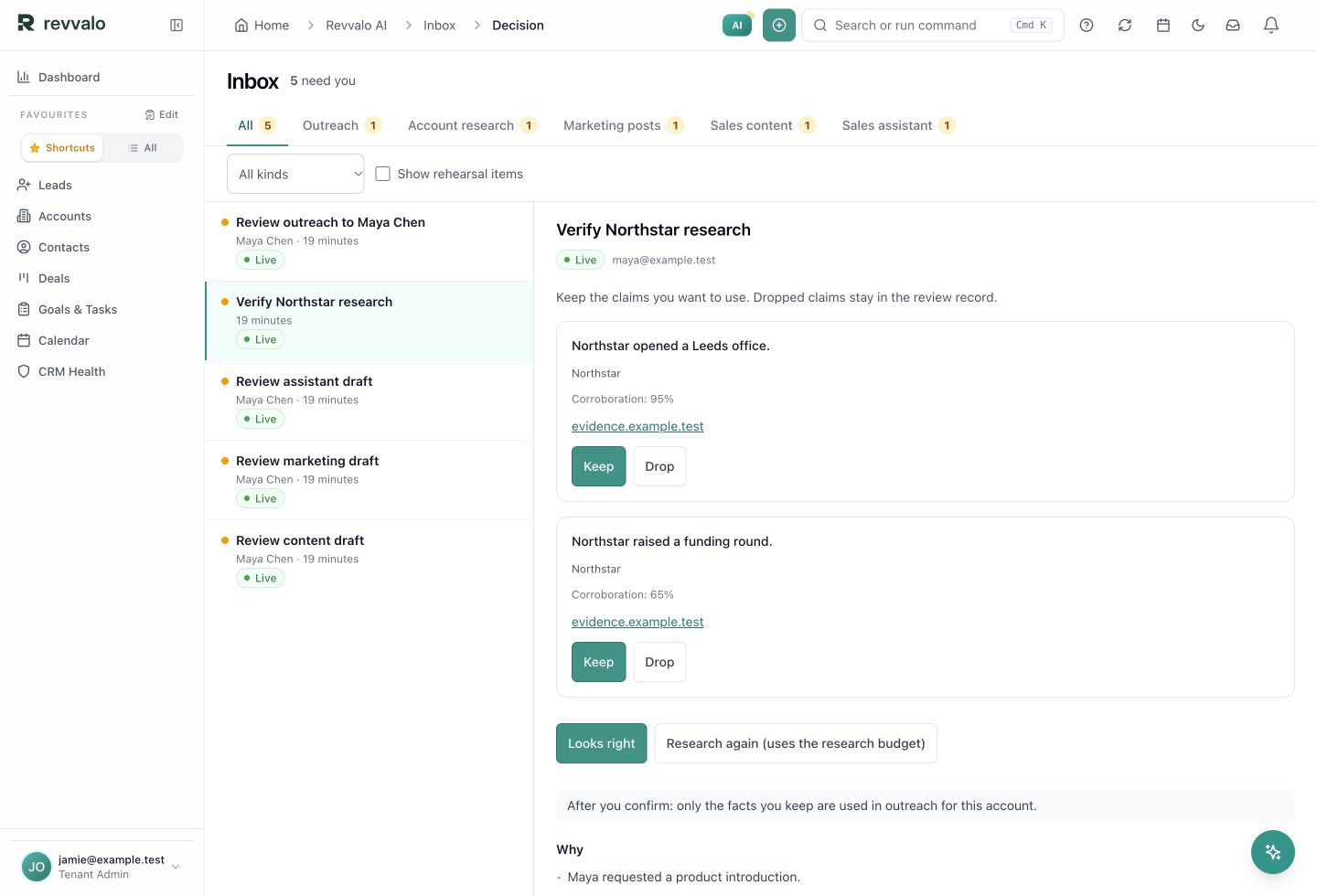
Revvalo research review showing source links, Keep and Drop controls, and fictional demo claims.
Research reviewProduct screenshot · Demo data
AI inboxActual Revvalo UI · Demo dataSwipe across to explore the screen
Enlarged Revvalo AI inbox with fictional demo records.
Built for the way you work

Your industry.
Your kind of workflow.

Choose an industry template that brings the right records, roles and operating workflow into your workspace. Your shared CRM stays at the centre.

A WORKSPACE BUILT AROUND YOUR OPERATION

A configured industry workspace: the objects you work with, the stages work moves through, and the views your team needs. Healthcare Staffing and Construction extend the CRM into day-to-day operations.

Original AI-generated editorial image of two healthcare professionals sharing a quiet handover.People at the heart of the work
01 / Healthcare Staffing template

The right people.
A connected staffing desk.

Bring client demand, worker readiness and placements into one operating flow. Keep the work connected from the first requirement to approved time and pay/bill handoff.

Built around
Clients, workers, requirements and assignments
Made for
Staffing consultants, operations, workers and clients
  1. Demand
  2. Readiness
  3. Placement
  4. Time + pay/bill
Explore Healthcare Staffing
Original AI-generated editorial image of a construction team reviewing a timber building on site.From a good plan to built work
02 / Construction template

From first opportunity
to work on site.

Carry the customer story into estimating, commercial decisions and project delivery. Connect the scope, resources and job finances so each team can see what comes next.

Built around
Opportunities, estimates, projects and job finances
Made for
Commercial teams, project delivery and operations
  1. Estimate
  2. Approve
  3. Deliver
  4. Job finances
Explore Construction

Start with the core CRM. Connect sales, marketing and service, then explore the industry configuration that fits your operation.

Explore templates & use cases ↗
Meet Revvalo AI

A specialist for
the work in front of you.

Choose the job you need help with. Explore the agents that can prepare the work, using your customer context and review rules.

3 of 8 capabilities

01

Research Agent

Find the right starting point.

Turn a target profile and company signals into sourced account research.

THE OUTPUTResearch dossiers + account context
Explore Research Agent
02

SDR Agent

Make the first move count.

Prepare outreach, coordinate follow-ups and qualify replies using your configured policy.

THE OUTPUTOutreach drafts + next steps
Explore SDR Agent
03

Sales Assistant

Bring context into the conversation.

Ask about a record, prepare an email or turn a conversation into a useful task.

THE OUTPUTAnswers + drafts + record actions
Explore Sales Assistant
04

Marketing Agent

Give your campaigns a plan.

Work from your brand voice and channels to build a calendar and coordinate review.

THE OUTPUTCampaign plans + schedules
Explore Marketing Agent
05

Content Agent

Turn knowledge into useful content.

Create draft battlecards, assessments and sales material from the context you provide.

THE OUTPUTReviewable content assets
Explore Content Agent
06

Revvalo AI Voice

Keep the conversation moving.

Handle configured calls, retain the conversation and support escalation or booking.

THE OUTPUTCall records + follow-up
Explore Revvalo AI Voice
07

Support Agent

Help with the whole story.

Use your knowledge base to triage questions, draft answers and hand work to your team.

THE OUTPUTSupport drafts + human handoffs
Explore Support Agent
08

Webchat Widget

Make your website part of the team.

Answer website questions, capture interest and help visitors take their next step.

THE OUTPUTConversations + enquiries
Explore Webchat Widget

Start with the jobs you need. Availability depends on your package, connected services and configuration.

Explore the full AI catalog ↗
AI-generated editorial scene of two colleagues discussing their next step at a sunlit office table.
More room for the conversations that matter. AI-generated editorial image.
Your people set the direction

Let AI prepare.
Let people decide.

Good automation makes the next decision easier. Keep the context, the proposed action and the person responsible together.

01 /

Give the work a clear scope

Choose the records, connections and permissions each workflow needs.

02 /

Review the moments that matter

Inspect a draft, request changes or reject a proposed action.

03 /

Keep the next person in the loop

Retain the activity and outcome with the customer record.

Explore review and control ↗
Connected, on your terms

Keep the tools
that earn their place.

Bring the work that belongs together into Revvalo. Keep specialist systems connected, with clear ownership of the records and actions that move between them.

Explore the connection map ↗
Your shared customer context
Email + conversationsWebsite + webchatContent + campaignsIndustry operations

Connect the services and action coverage your workflow needs.

A few useful answers

Before your
next move.

Get a feel for the fit, then bring your questions to the conversation.

Talk to the team ↗
How do I get started?

Create your own account with your work email, then follow the setup steps for your workspace. You can review the available plans and terms during signup. If you would like help choosing, request a demo.

Is Revvalo a CRM or an AI tool?

Both work together. The CRM holds your companies, contacts, deals and conversations. Revvalo AI uses the relevant context to help research accounts, prepare outreach, create content and support customers. Explore the platform.

Does the AI act without my team?

You choose the scope, permissions and review points. Workflows can prepare proposed actions for a person to inspect, change or reject. The examples on this page require human review. See how control works.

Can we keep our existing tools?

Start with the workflow you want to connect. We’ll help check the systems, supported actions and record ownership it needs. Coverage depends on the connection and your configuration. Explore integrations.

How do industry workspaces differ?

The shared CRM stays at the centre. Healthcare Staffing adds a flow from demand and worker readiness to placement and time. Construction connects estimates, commercial decisions and delivery. Find your workflow.

What will we cover in a demo?

Bring one workflow and the tools your team uses today. We’ll discuss the relevant records, agents, review points and setup, then agree the next step. Your enquiry starts the conversation; a time is confirmed with our team.

Make it work for your team

Your next move.
Start with Revvalo.

Create your account and choose the workspace that fits your team. Want a closer look first? We can walk you through it.